Navigation: Cart Settings > Order Settings Overview > Enable/Add Gateway > Setting Up Linkpoint.com >
Setting Up Google Checkout


|
Navigation: Cart Settings > Order Settings Overview > Enable/Add Gateway > Setting Up Linkpoint.com > Setting Up Google Checkout |
|

Google Checkout is a payment system that can be used in the cart to accept credit cards.
To register for an account, click here .
Once you have registered, you will need to activate Google Checkout in the admin area of the cart and enter in your account information.
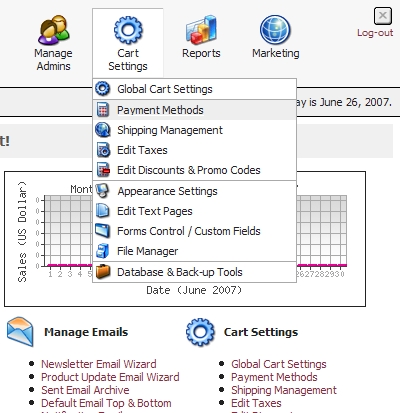
| • | Go to 'Cart Settings' > 'Payment Methods' |
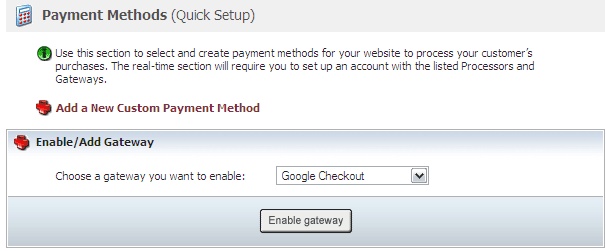
| • | Scroll down to 'Enable/Add Gateway'. Under 'Enable/Add Gateway' select 'Google Checkout'. |
| • | You will want to use your Google Checkout Vendor ID and Merchant Key available from the Google Checkout API link. |
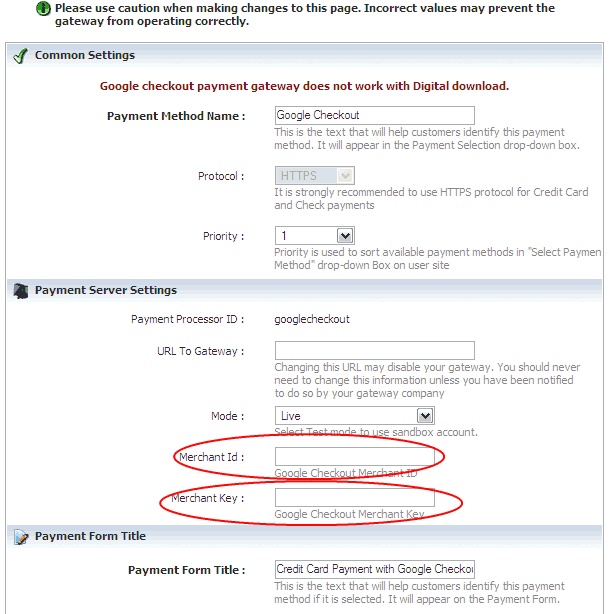
| • | Once you have input this information, you will need to set the 'Mode' to either 'Test' or 'Live' depending on wether or not you want to test the gateway out live right away. |
| • | You do not need to modify the 'URL To Gateway' field unless Google instructs you to do so. |
| • | *Please note that Google checkout does not work with Digital download products. |