Navigation: Cart Settings > Global Cart Settings Overview > Languages & Currencies Settings Overview > Currency Overview >
Delete Currency


|
Navigation: Cart Settings > Global Cart Settings Overview > Languages & Currencies Settings Overview > Currency Overview > Delete Currency |
|
You can use this section to delete the existing or custom currency of Cart.
To delete an existing or custom currency of Cart, follow the steps:
1. Scroll down to Currencies in Use in Currency page.
2. Click Delete  icon for a currency you want to remove.
A pop up appears asking for confirmation, as shown in the Figure 6-15-1 below.
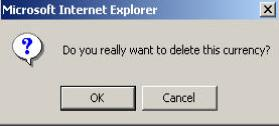
Figure 6-15-1: Delete Confirmation
3. Click OK button to remove it.